
GHL contact quick actions: three clicks become one
GHL contact quick actions put a bar on every contact with one-tap tags, buttons that kick off workflows and mini forms that update custom fields. Your subscribers' teams stop hunting through the record and just press the action.
How do GoHighLevel quick tags save time?
Tagging a contact in stock GoHighLevel means opening the tag field, typing, picking and saving. A quick tag is one tap, and because workflows trigger on tags, that tap can also start onboarding, a renewal sequence or an NPS survey. Fewer clicks per contact, multiplied across a team, is real time back.
Without the bar
- Open contact, find tags, type, select, save
- Custom fields edited one by one
- Workflow triggers depend on remembering the right tag
With contact actions
- One tap adds or removes a tag
- A small form saves several fields at once
- Buttons carry the right tag, so the right workflow runs
The GHL contact buttons, set up for a SaaS desk
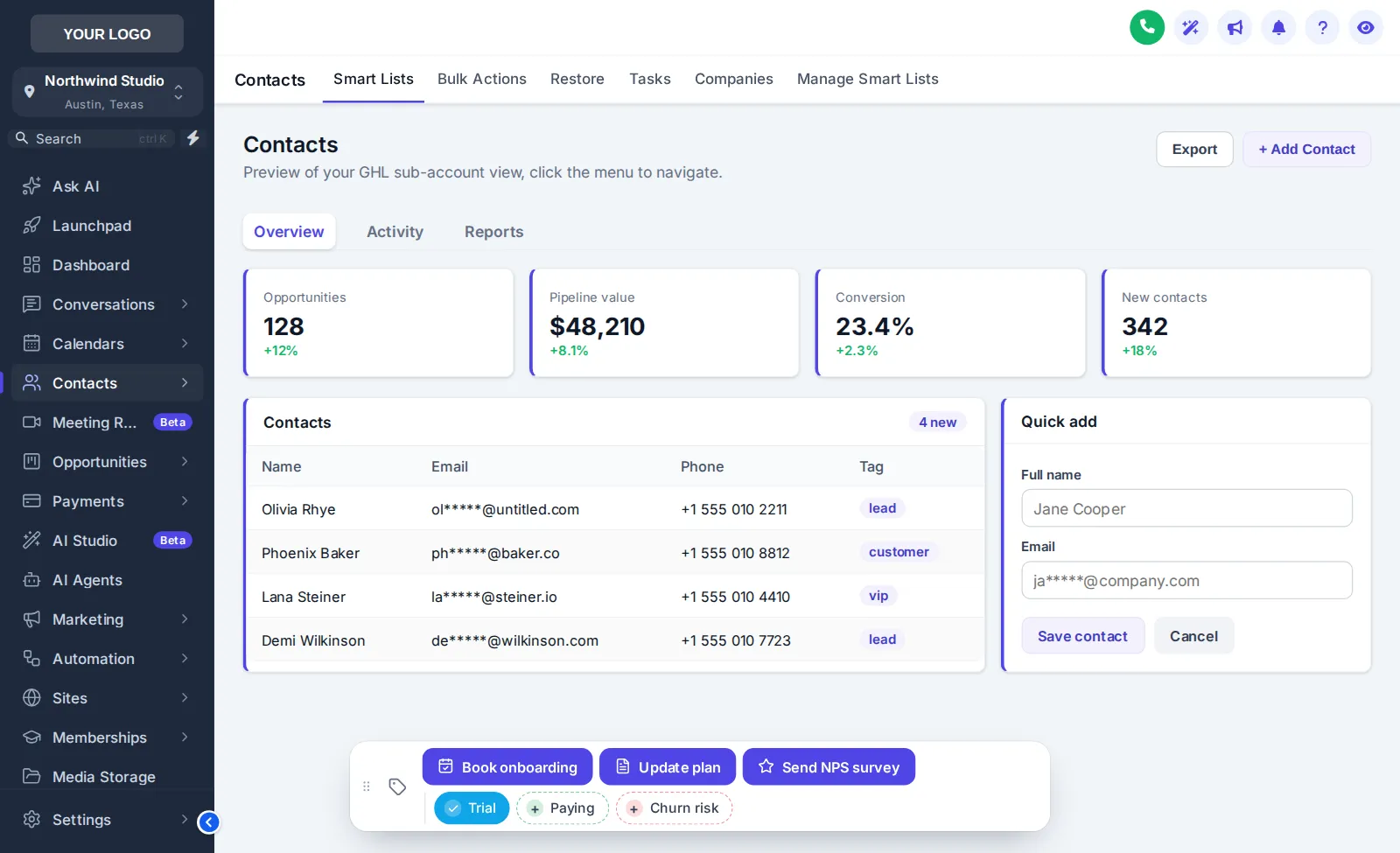
Tags: Trial, Paying, Churn risk. Buttons: Book onboarding, Update plan (a form with plan, MRR and renewal date), Send NPS survey.
The real bar. Tap a tag to add or remove it, press Update plan to open its form, or drag the bar by its grip. Nothing is saved in the preview.
One-click tags GoHighLevel workflows understand
No new triggers to build: the bar writes ordinary tags.
Forms into custom fields
Capture plan, MRR or renewal dates in one dialog.
6 positions, draggable
Out of the way of GoHighLevel's own buttons.
Quick actions, tags and buttons
CAB-01What are GHL contact quick actions?
A bar on each GoHighLevel contact record with one-tap tags, buttons that add tags to start workflows, and small forms that write to custom fields. It is part of the contact actions module, included from Scale.
CAB-02How does a quick action start a workflow?
A button adds (or removes) a tag on the contact. Any GoHighLevel workflow with that tag as its trigger then runs as normal, so the bar works with automations you already have.
CAB-03Can a button update custom fields?
Yes. A button can open a short form (text, number, date or dropdown fields) and save the answers straight into the contact’s custom fields, like the Update plan example in the preview.
CAB-04Where can the bar sit?
In 6 positions: bottom centre, left or right, and top centre, left or right. Users can also drag it by its grip.
CAB-05Can tags have their own colours?
Yes: one colour per tag, your brand colour for all of them, or an on/off pair that shows at a glance whether a tag is applied.
CAB-06Does anything get saved in the preview?
No. The preview runs the real bar on a sample contact, but nothing is stored or sent. Inside GoHighLevel the contact updates immediately.
CAB-07What are good quick tags for a SaaS reseller?
Lifecycle states your workflows already use: trial, paying, churn risk, onboarding booked, NPS sent. One tap replaces opening the tag field, typing and saving.
CAB-08Who sees the bar?
Users in sub-accounts on your white-label domain, on the contact detail page. Set the buttons and tags once in the editor and they appear for everyone.
Related modules
Put the next action one tap away.
Contact actions, dashboards, pipelines and mega menus are all in Scale. $797 one-time, login emailed within minutes (max 24 hours).
GoHighLevel and HighLevel are trademarks of HighLevel, Inc. SAAS GHL Snapshot is an independent business and is not affiliated with, endorsed by or sponsored by HighLevel. The GHL Customizer is third-party software that runs on top of your own GoHighLevel account; screenshots and previews show sample data. Prices are one-time, in USD, as listed on the pricing page.