
GHL pipeline design that fits any stages you use
GHL pipeline design with the customizer restyles the opportunities board: 12 designs, from clean light boards to dark ones, with stage colours that follow column position. Rename stages as you like; the board keeps its look.
How do custom pipeline colours work in GHL?
Each board design defines colours by column position (first stage, second stage and so on), not by stage name. That is why one design fits every pipeline in every sub-account: a SaaS trial pipeline and a services pipeline both get a consistent, readable board without any setup.
Switch GoHighLevel opportunities board styles
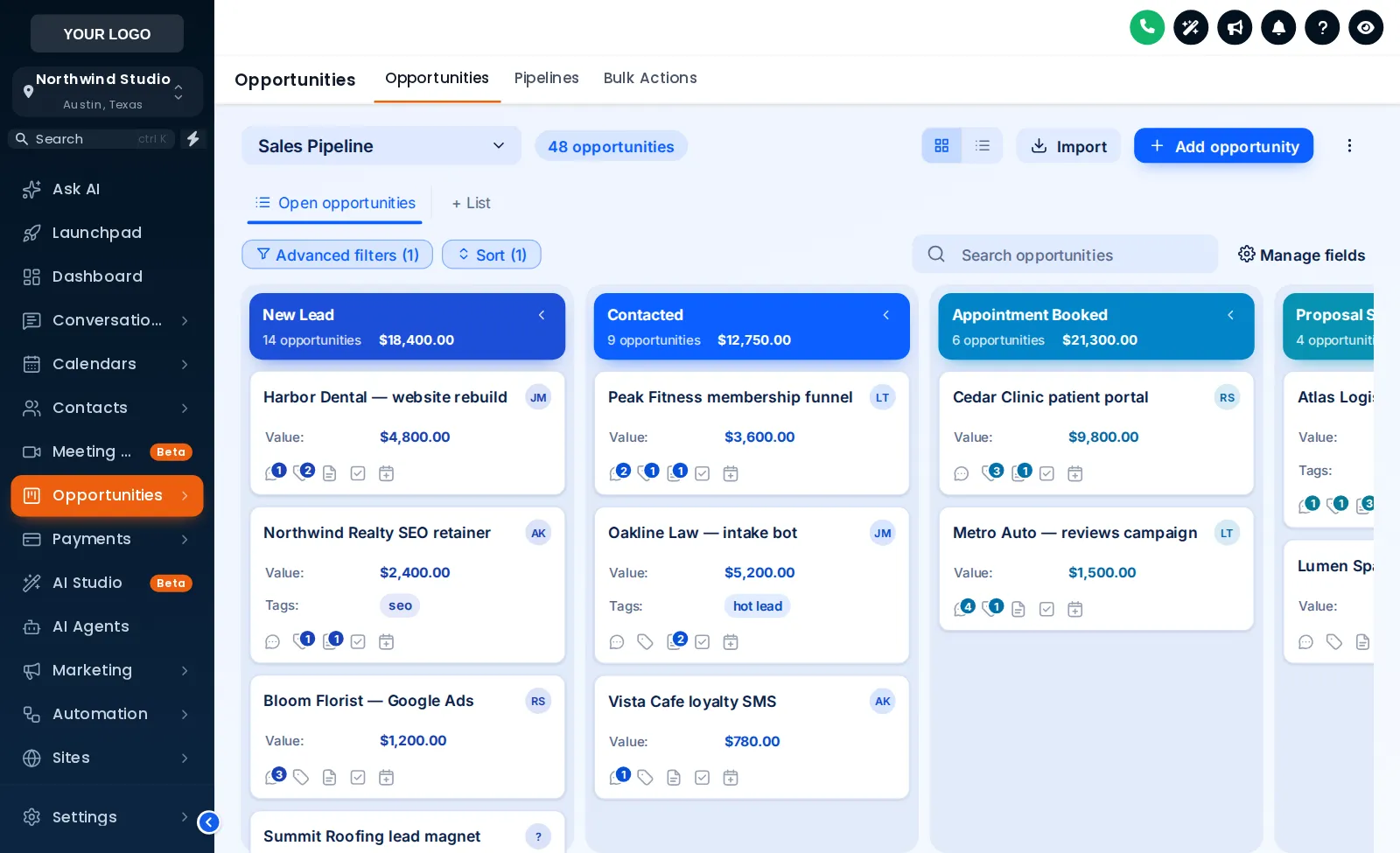
Ocean Pro is loaded first. Pick any of the 12 designs and a sidebar theme.
A copy of the GoHighLevel opportunities board with a sample pipeline. Stage colours follow column position, so your own stages pick them up whatever they are called.
GHL kanban style for SaaS sales desks
Trial-to-paid boards
Trial, demo, proposal, won: a high-contrast design makes stuck trials visible at a glance.
Renewals and expansion
Use a calm light board for renewal pipelines that are reviewed weekly rather than worked hourly.
Subscriber sales teams
Your subscribers' own reps live in the board. A designed board is one more reason they think of the product as yours.
Switching a board design
Open the board designer
In the editor, open the opportunities board section.
Pick a design
Choose one of 12; the preview uses a sample pipeline.
Check with your theme
Preview it beside your sidebar theme, light or dark.
Publish
Every pipeline in every sub-account updates on reload.
instant
Opportunities board design questions
PIP-01Can I change how the GHL pipeline board looks?
Yes. The pipeline designer restyles the GoHighLevel opportunities board with one of 12 designs (2 of them dark): column headers, card style, stage colours and spacing. It is included from Scale.
PIP-02Do I have to rename or rebuild my pipelines?
No. Stage colours follow column position, so any pipeline, whatever its stages are called, picks up the design automatically. Your opportunities, values and automations are untouched.
PIP-03What does Ocean Pro look like?
Ocean Pro uses corporate blues with solid header bands on each stage, which reads well on large boards. It is the default in the preview and the screenshot on this page.
PIP-04Will the opportunities board still work the same?
Yes. Drag and drop, filters and opportunity details are GoHighLevel’s own; the designer only changes their appearance.
PIP-05Why does board design matter in a SaaS-mode product?
Many subscribers buy GoHighLevel to run a sales pipeline. The board is where they spend sales time, so a designed board makes the product feel purpose-built rather than generic.
PIP-06Can I match the board to my theme?
Yes. Pair any board design with any theme; use the Sidebar chips in the preview to check combinations.
PIP-07Does it work with multiple pipelines?
Yes. Because colours are tied to column position rather than stage names, every pipeline in a sub-account gets the same consistent look.
PIP-08Is the GoHighLevel opportunities board readable on mobile?
Use the Phone button above the preview to check the design at phone width before publishing.
Related modules
A board your subscribers want to work in.
12 pipeline designs, 18 dashboards and the full navigation layer in Scale. $797 one-time.
GoHighLevel and HighLevel are trademarks of HighLevel, Inc. SAAS GHL Snapshot is an independent business and is not affiliated with, endorsed by or sponsored by HighLevel. The GHL Customizer is third-party software that runs on top of your own GoHighLevel account; screenshots and previews show sample data. Prices are one-time, in USD, as listed on the pricing page.